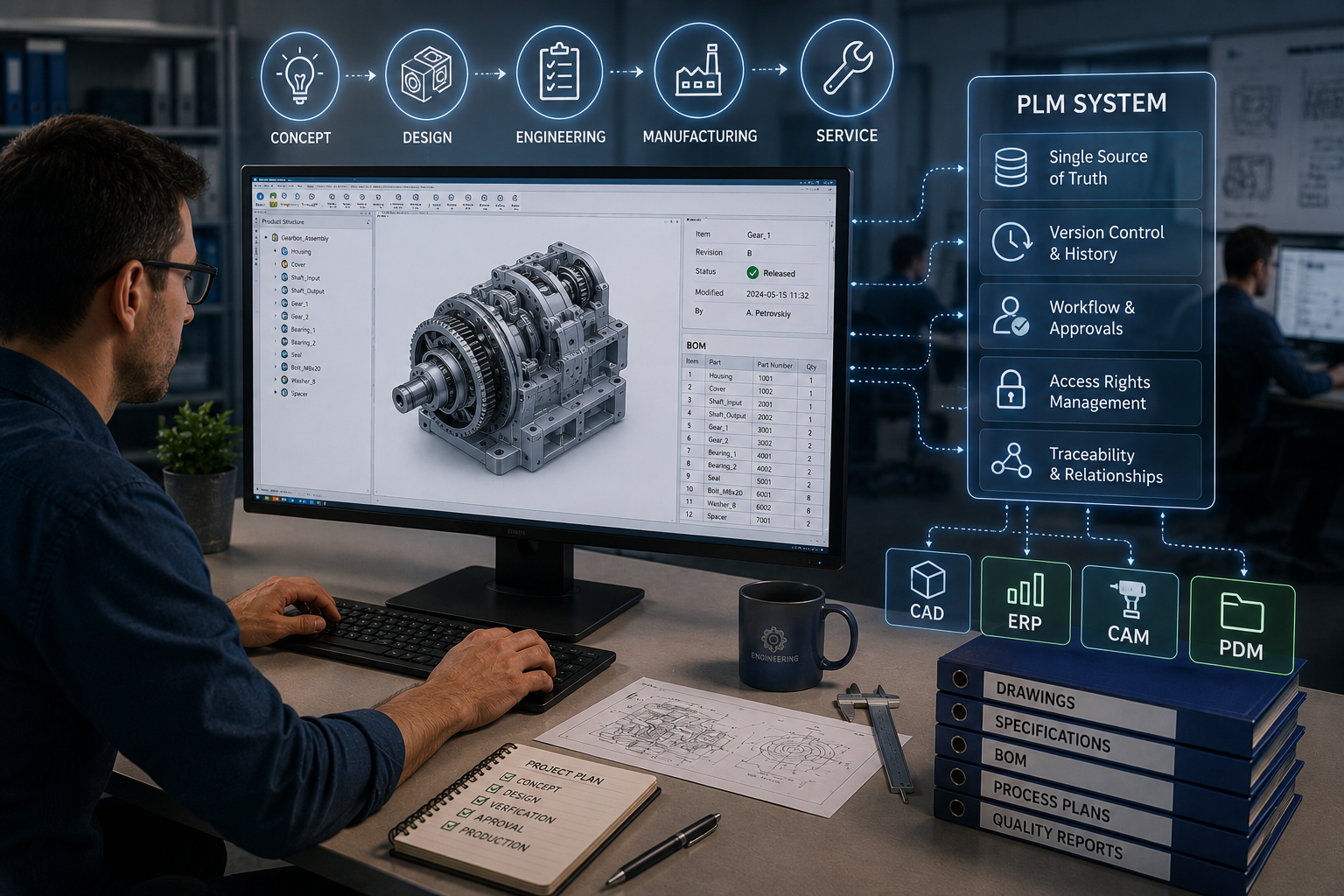
PLM (Product Lifecycle Management) is a product lifecycle management system that stores and controls all data relating to a product, from concept to end of production. A PLM system automatically maintains the latest version of a document, retains previous revisions and records who made changes and when. Within a single environment, it brings together 3D models, drawings, BOM specifications, manufacturing routes, approval statuses and change requests. For a company, this means that designers, process engineers, production and procurement teams work not with disparate files, but with a single product structure.
Unlike a file repository, PLM sees not just a file with a name, but a technical object with a version, status, access rights and links to other data. For example, if a part in a 3D model is changed, the system helps to track which drawings, BOM items and manufacturing processes need to be reviewed. A standard folder won’t show this. It stores the document, but doesn’t explain how it affects the product, procurement, assembly or subsequent production.
A file repository, such as a network folder or Google Drive, stores files as individual documents but does not recognise the links between versions, parts, BOM specifications and manufacturing processes. As a result, design documentation is often managed manually: via file names, comments in emails or separate spreadsheets. PLM works differently: it stores structured data about the product, records approval statuses, object-level access rights and the history of design changes. For example, if an engineer changes the dimensions of a part, in a file repository they would need to manually check the drawings, BOM and related documents, whereas in PLM the links between objects are updated automatically. The difference is most clearly seen when comparing the two.
| Criterion | File repository | PLM system |
| Version control | Versions are often distinguished by the file name: final, new, v2, v3 | The system automatically tracks revisions, current versions and previous changes |
| Access rights | These are usually configured at folder or shared drive level | Can be configured at the level of a detail, document, role or approval status |
| Relationships between objects | Drawings, BOMs and manufacturing processes are stored separately | A part is linked to a drawing, a BOM specification and a production route |
| Change history | Often relies on manual comments or correspondence | It is clear who changed the object, when, why and at which stage of approval |
PLM does not replace electronic document management, but extends it where standard document approval is no longer sufficient. It adds a link to a specific product, manages version control for 3D models, drawings and technical documentation, and initiates automated approval workflows between departments. In other words, the system works not just with a file, but with its technical context: the part, the assembly, the BOM specification, the revision and the approval status.
Document workflows within a company may cover contracts, orders, invoices and general internal processes, whilst PLM handles the engineering side. For example, a typical workflow looks like this: part design → quality control check → approval by the process engineer → final approval. Each stage is recorded in the system, so the team can see where a document is at any given moment, who is responsible for checking it, and which version is ready to be sent to production.
At a mechanical engineering company, a PLM system consists not of individual files, but of interconnected product data. 3D models are usually created in a CAD environment, after which the PLM system captures them along with drawings, versions, specifications and approval statuses. This data can then be transferred to the ERP system so that production, procurement and warehousing can work with up-to-date information, rather than manual spreadsheets or files from email. To better understand what such a system consists of, it is worth breaking it down into several key components:
When this data is brought together in a single environment, the team sees not just a set of documents, but the complete logic of the product: from the 3D model to the procurement of materials and the start of production. For organisations that need to integrate CAD data, engineering processes, approvals and teamwork, the 3DExperience Platform from Dassault Systèmes offers a practical solution. This approach helps maintain the link between design, specifications and actual manufacturing operations.
It is worth switching to PLM when file storage no longer helps to manage data, but merely accumulates new file versions. This is particularly evident in manufacturing, where the number of parts and assemblies is growing, designers spend time searching for the latest drawing, and the company’s document workflow relies on paper documents, manual approvals and spreadsheets. In such a situation, we offer a high-quality PLM implementation from GEO-MENTOR, which will help ensure a swift and straightforward transition to managed version control, BOMs, technical documentation and change history. To quickly assess your needs, check for the following practical indicators:
If your team is already familiar with some of these issues, your organisation has effectively outgrown a standard file repository. PLM helps to bring together design data, approvals, specifications and manufacturing links into a single, coherent system, where every change has an author, a status and a traceable history. For companies operating in various manufacturing sectors, industry-specific PLM solutions for production can be considered to tailor the system to specific processes: mechanical engineering, aerospace, infrastructure construction, the oil and gas sector, or the mining industry.
A PLM system is essential for a company where a standard file repository is no longer sufficient for managing engineering data. It helps to work with the latest versions of documents, links 3D models, drawings, BOMs and design documentation, and maintains a change history without the need for manual searches through folders or correspondence.
This is particularly important for engineering companies dealing with a large number of parts, assemblies and revisions, as a single error in a version can affect production, procurement or assembly. PLM does not simply complement electronic document management; it makes engineering approvals manageable, with statuses, responsible parties, approval workflows and clear links between all product data.
Yes, if your file storage system no longer manages versions, statuses and relationships between documents. A folder can store drawings or a 3D model, but it does not show the complete product structure. A PLM system links parts, BOMs, design documentation, approval workflows and changes. This is important when designers, process engineers, procurement and production teams are all working on the same product simultaneously on a daily basis.
PLM is broader in scope than PDM, although these systems often operate side by side or share common functions. PDM is typically responsible for managing CAD files, versions and engineering documents. PLM covers the product lifecycle, the BOM, changes, approval workflows, preparation for production and integration with ERP. In short, PDM deals with design data, whilst PLM deals with the product within a broader process.
Typically, the timeframe depends on the size of the organisation, the number of departments, the state of the design documentation, and the required integrations with CAD and ERP. A small pilot project might cover a single product, a group of users or a single approval route. It is best to roll out a full PLM implementation in stages: first, a process audit; then the data structure; followed by team training, document migration and the go-live phase.
Yes, mechanical engineering is one of the sectors where PLM delivers the most tangible benefits. A product may have hundreds of parts, several assembly levels, various revisions, purchased components and manufacturing routes. Without systematic control, the team quickly faces confusion over versions. PLM helps to clearly link 3D models, drawings, BOMs and changes into a single, managed structure.
No, PLM does not completely replace electronic document management. It closes the engineering loop, where documents must be linked to a product, part, assembly or change. Electronic document management can still be used for contracts, orders, invoices and general business processes. PLM is required where version control of 3D models, the status of design documentation, BOMs and change control prior to production are important, without any confusion.

